When was the last time you heard someone ask in a standup, “How could we do this more sustainably?”
Topics like green software and carbon efficiency are unfortunately rarely at the top of busy development teams’ priority lists. What’s more, there are very few “green software practitioners” out there. But we believe we’re at a unique moment in time where this can all change. The next generation of AI-enabled developer tooling has the opportunity to create near-effortless, always-on engineering for sustainability.
The GitHub Next and GitHub Sustainability teams have been collaborating to prove this concept and value through a series of internal and external pilot projects.
We call it Continuous Efficiency.
Making the case for Continuous Efficiency
We believe that once it’s ready for broader adoption, Continuous Efficiency will have the potential to make a significant positive impact for developers, businesses, and sustainability.
For developers
Digital sustainability and green software are intrinsically aligned to “efficiency,” which is at the core of software engineering. Many developers would benefit from performant software, better standardization of code, change quality assurance, and more.
For businesses
Building for sustainability has measurable business value, including:
Reducing power and resource consumption
Increasing efficiency
Better code quality
Improved user experience
Lower costs
Despite this, sustainability rarely makes it onto the roadmap, priority list, or even the backlog. But imagine a world in which the codebase could continuously improve itself…
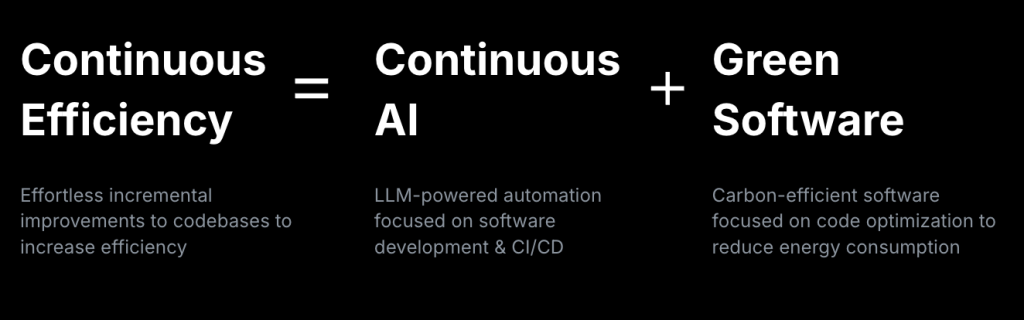
Continuous Efficiency means effortless, incremental, validated improvements to codebases for increased efficiency. It’s an emergent practice based on a set of tools and techniques that we are starting to develop and hope to see the developer community expand on.
This emerges at the intersection of Continuous AI and Green Software.
Continuous AI is AI-enriched automation to software collaboration. We are exploring LLM-powered automation in platform-based software development and CI/CD workflows.
Green Software is designed and built to be more energy-efficient and have a lower environmental impact. This practice tends to result in software that is cheaper, more performant, and more resilient.
Continuous Efficiency in (GitHub) Action(s)
While Continuous Efficiency is a generally applicable concept, we have been building implementations on a specific GitHub platform and infrastructure called Agentic Workflows. It’s publicly available and open source, but currently in “research demonstrator” status (read: experimental prototype, pre-release, subject to change and errors!). Agentic Workflows is an experimental framework for exploring proactive, automated, event-driven agentic behaviors in GitHub repositories, running safely in GitHub Actions.
Our work in this space has been focused on two areas:
Implementing rules and standards
With modern LLMs and agentic workflows, we can now express engineering standards and code-quality guidelines directly in natural language and apply them at a scale that was previously unattainable.
This capability goes far beyond traditional linting and static analysis approaches in three important ways:
Declarative, intent-based rule authoring: you describe the intent in natural language and the model interprets and implements it (no need for hard-coded patterns or logic).
Semantic generalizability: a single high-level rule can be applied across diverse code patterns, programming languages and architectures, giving far broader coverage than conventional tools and approaches.
Intelligent remediation: this approach comprehensively resolves issues and violations through agentic, platform-integrated actions, like writing a pull request or adding comments and suggested edits to a change.
Examples of our work:
Case study: Code base reviews Green software rules implementation
We have implemented a wide range of standard and specific Green Software rules, tactics and patterns. These can be applied fully agentically to entire codebases and repos.
Example: We teamed up with the resolve project to scan their codebase with a number of rules, and agentically delivered proposed improvements. The outputs weren’t all perfect—but one of the recently approved and merged pull requests makes a small performance improvement by “hoisting” RegExp literals from within hot functions.
The project gets 500M+ downloads per month on npm. So this small impact will scale!
Case study: Implementing standards Web sustainability guidelines (WSG)
The W3C WSG is a great resource to help people make web products and services more sustainable. We implemented the Web Development section into a set of 20 agentic workflows, so now the guidelines can be used by AI too!
Example: We have run the WSG workflows on a number of GitHub and Microsoft web properties and found opportunities and built resolutions to improve them—ranging from deferred loading to using native browser features and latest language standards.
Heterogeneous performance improvement
Performance engineering is notoriously difficult because real-world software is profoundly heterogeneous. Every repository brings a different mix of languages and architectures, and even within a single codebase, the sources of performance issues can span from algorithmic choices to cache behavior to network paths.
Expert performance engineers excel at navigating this complexity, but the sheer variety and volume of work across the industry demands better tooling and scalable assistance.
We’ve been thinking about the “grand challenge” of how to build a generic agent that can walk up to any piece of software and make demonstrable performance improvements. One that could navigate the vast ambiguity and heterogeneity of software in the wild—no small task!
Semi-automatic performance engineering aims to meet that need with an automated, iterative workflow where an agent researches, plans, measures, and implements improvements under human guidance. The process begins with “fit-to-repo” discovery—figuring out how to build, benchmark, and measure a given project—before attempting any optimization. Modern LLM-based agents can explore repositories, identify relevant performance tools, run microbenchmarks, and propose targeted code changes.
Early results vary quite dramatically, but some show promise that guided automation can meaningfully improve software performance at scale.
Case study: Daily perf improver
Daily Perf Improver is a three-phase workflow, intended to run in small daily sprints. It can do things like: (1) Research and plan improvements (2) Infer how to build and benchmark the repository (3) Iteratively propose measured optimizations
Example:On a focused recent pilot on FSharp.Control.AsyncSeq it has already delivered real gains by producing multiple accepted pull requests, including a rediscovered performance bug fix and verified microbenchmark-driven optimizations.
GitHub agentic workflows enable you to write automation in natural language (Markdown) instead of traditional YAML or scripts. You author a workflow in a .md file that begins with a YAML-like “front matter” (defining triggers, permissions, tools, safe-outputs, etc.), followed by plain-English instructions. At build time you run the gh aw compile command (part of the agentic workflows CLI) which compiles the Markdown into a standard GitHub Actions workflow (.yml) that can be executed by the normal GitHub Actions runtime.
When the compiled workflow runs, it launches an AI agent (for example via GitHub Copilot CLI, or other supported engines like Claude Code or OpenAI Codex) inside a sandboxed environment. The agent reads the repository’s context, applies the human-written natural-language instructions (for example “look for missing documentation, update README files, then open a pull request”), and produces outputs such as comments, pull requests, or other repository modifications. Because it’s running in the GitHub Actions environment, permission boundaries, safe-output restrictions, logs, auditability, and other security controls remain.
How we build our Continuous Efficiency Workflows (with agents, of course!)
Our internal process for creating Continuous Efficiency workflows follows a simple, repeatable pattern:
Define the intent: based on a public standard or a domain-specific engineering requirement.
Author the workflow in Markdown: using structured natural language, guided interactively by the create-agentic-workflow agent.
Compile to YAML: turning the Markdown into a standard GitHub Actions workflow.
Run in GitHub Actions: executing the workflow on selected repositories
Want to get involved in Continuous Efficiency?
If you’re a developer who loves the experimentation phase, you can already get started with running agentic workflows in GitHub Actions now! There are a range of examples that you can immediately try out (including a “Daily performance improver”) or author your own using natural language.
GitHub Sustainability will soon be publishing rulesets, workflows, and more—if you’re interested in being an early adopter or design partner, please get in touch with me.
In November, we experienced three incidents that resulted in degraded performance across GitHub services.
November 17 16:52 UTC (lasting 2 hours and 16 minutes)
On November 17, 2025, from 16:52 to 19:08 UTC, Dependabot was hitting a rate limit in GitHub Container Registry (GHCR) and was unable to complete about 57% of jobs within SLO.
To mitigate the issue, we lowered the rate at which Dependabot started jobs and increased the GHCR rate limit. This mitigated the circumstances and led to the resolution of the incident.
Longer term, we’re adding new monitors and alerts to help prevent this in the future.
November 18 20:30 UTC (lasting 1 hour and 4 minutes)
On November 18, 2025, from 20:30 to 21:34 UTC, we experienced failures on all Git operations, including both SSH and HTTP Git client interactions, as well as raw file access. These failures also impacted products that rely on Git operations.
The root cause was an expired TLS certificate used for internal service-to-service communication. We mitigated the incident by replacing the expired certificate and restarting impacted services. Once those services were restarted we saw a full recovery.
We have updated our alerting to cover the expired certificate, and we are performing an audit of other certificates in this area to ensure they also have the proper alerting and automation before expiration. In parallel, we are accelerating efforts to eliminate our remaining manually managed certificates, ensuring all service-to-service communication is fully automated.
November 28 05:59 UTC (lasting 2 hours and 24 minutes)
On November 28, 2025, between approximately 05:59 and 08:24 UTC, Copilot experienced an outage affecting the Claude Sonnet 4.5 model. Users attempting to use this model received an HTTP 400 error indicating no model was available until an alternative model was selected. Other models were not impacted.
The issue was caused by a misconfiguration deployed to an internal service, which made Claude Sonnet 4.5 erroneously listed as unavailable. The problem was identified and mitigated by reverting the configuration change. We are working to improve cross-service deploy safeguards to prevent similar incidents in the future.
Follow our status page for real-time updates on status changes and post-incident recaps. To learn more about what we’re working on, check out the engineering section on the GitHub Blog.
GitHub Actions has grown massively since its release in 2018; in 2025 alone, developers used 11.5 billion GitHub Actions minutes in public and open source projects, up 35% year over year from 2024. At the same time, this has not been without its growing pains, and you’ve made clear to us what improvements matter most: faster builds, improved security, better caching, more workflow flexibility, and rock-solid reliability.
Meeting that level of demand first required a deliberate investment in re-architecting the core backend services powering every GitHub Actions job and runner. This was a substantial effort that laid the foundation for the long-term performance, scalability, and feature delivery you’ve been asking for. That new architecture is rolled out, powering 71 million jobs per day and giving us deeper visibility into developer experience across the platform.
With that work behind us, we shift our attention back to your top requests for much needed, long-standing quality-of-life improvements. Below, we’ll walk through what we’ve shipped this year, how you can get started with these upgrades today, and what’s coming in 2026.
Let’s jump in.
Rebuilding the core of GitHub Actions
In early 2024, the GitHub Actions team faced a problem. The platform was running about 23 million jobs per day, but month-over-month growth made one thing clear: our existing architecture couldn’t reliably support our growth curve. In order to increase feature velocity, we first needed to improve reliability and modernize the legacy frameworks that supported GitHub Actions.
The solution? Re-architect the core backend services powering GitHub Actions jobs and runners. Our goals were to improve uptime and resilience against infrastructure issues, improve performance and reduce internal throttles, and leverage GitHub’s broader platform investments and developer experience improvements. We aimed to scale 10x over existing usage. This effort was a big bet and consumed a significant part of our team’s focus. And the work is paying off by helping us handle our current scale, even as we work through the last pieces of stabilizing our new platform.
Since August, all GitHub Actions jobs have run on our new architecture, which handles 71 million jobs per day (over 3x from where we started). Individual enterprises are able to start 7x more jobs per minute than our previous architecture could support.
This was not without its share of pain; it slowed the pace of feature work and delayed progress on long-standing community requests. We knew this would be a tough call, but it was a critical decision to enable our future roadmap and sustainability as a product.
Shifting our focus back to community-requested improvements
We acknowledge we still have a ways to go, and this is just the beginning of this new chapter of the GitHub Actions story. As we shift our focus back to much-needed improvements, we want to call out some of the most recent ships on this front:
YAML anchors reduce duplication in complex workflows
First up, we shipped support for YAML anchors, one of the most requested features across both the runners and community repositories. YAML anchors reduce repetitive configuration in GitHub Actions workflows by letting you define settings once with an anchor (&) and reference them elsewhere with an alias (*). This allows you to maintain consistent environment variables, step configurations, or entire job setups across your workflows—all defined centrally rather than repeated across multiple jobs.
Non-public workflow templates let organizations set up common templates for their teams directly in their .github repository, giving developers a reliable starting point when spinning up new workflows. Instead of manually copying CI patterns across repositories, teams can now work from a shared set of patterns.
Deeper reusable workflows for modular, large-scale pipelines
We shipped increases to reusable workflow depth (another key request from the community). Reusable workflows let you break your automation into modular, shareable pieces. With the updated limits now supporting 10 levels of nesting and 50 workflow calls per run, teams now have more flexibility to structure their CI/CD pipelines in a way that’s maintainable and scales with their architectural requirements.
For teams with larger codebases or complex build pipelines, the old 10GB GitHub Actions cache limit often meant build dependencies were evicted before they could speed up your next workflow run, leading to repeated downloads and slower builds. This release was only possible due to our architecture rework and fulfills a request from the community, particularly among some of our largest users.
These releases are designed to improve day-to-day workflow quality and remove long-standing friction.
What’s coming in early 2026
This is just the beginning as there is much we need to do to deliver an even better experience with GitHub Actions. Here’s what we’re planning for the first quarter of 2026, influenced by some of the top requests from our community:
UX improvements, including faster page load times, better rendering for workflows with over 300 jobs, and a filter for the jobs list.
Moreover, we’ll start work on parallel steps, one of the most requested features across GitHub Actions. Our goal is to ship it before mid-2026. Lastly, we are going to raise the bar and start to address some of the asks to lift quality in our open source repositories—we appreciate we need to drive up the quality of our experience here as well.
Help us shape the 2026 roadmap for GitHub Actions
GitHub Actions is one of the most important primitives on GitHub. It powers the builds, tests, deployments, automations, and release processes that define how software ships today.
Our promise to you: 2026 will bring more consistent releases, more transparency, and continued focus on the fundamentals that matter most. We are also increasing funding towards this area to enable us to meet your expectations faster than before.
And this is where we need your help to make sure we’re focusing on the quality-of-life improvements that matter the most. We need your feedback. To support our work:
Join us in our new community discussion post, where the GitHub Actions product and engineering leads will be actively discussing with you what comes next.
Help us drive a plan for next year to make actions the best it can be.
For the past four years, the conversation about AI and software development has moved faster than most people can track. Every week, there is a new tool, a new benchmark, a new paper, or a new claim about what AI will or won’t replace. There is certainly noise, but even if sometimes data seems inconclusive or contradictory, we still know more now than three years ago about AI adoption.
With four years of AI adoption under our belt, we are also able to start seeing the shift in what it means to be a software developer. I lead key research initiatives at GitHub where I focus especially on understanding developers’ behavior, sentiment, and motivations. The time we are in with AI is pivotal, and I interview developers regularly to capture their current perspective. Most recently I conducted interviews to understand how developers see their identity, work, and preferences change as they work more closely than ever with AI.
The TL;DR? The developers who have gone furthest with AI are working differently. They describe their role less as “code producer” and more as “creative director of code,” where the core skill is not implementation, but orchestration and verification. Let’s dive in for the more detailed findings, alongside key stats from the 2025 Octoverse report.
2023: Curiosity, hesitation, and identity questions
Two years ago, we interviewed developers to understand their openness to having AI more deeply integrated into their workflow. At the time, code completions had become mainstream and agents were only a whisper in the AI space. Back then, we found developers eager to get AI’s help with complex tasks, not just filling in boilerplate code. Developers were most interested in:
Summaries and explanations to speed up how they make sense of code related to their task, and
AI-suggested plans of action that reduce activation energy. In contrast, developers wanted AI to stay at arm’s length (at least) on decision-making and generating code that implements whole tasks.
The explanation of that qualitative trend from 2023 is important. At the time, AI was seen as still unreliable for large implementations. But there was more to the rationale. Developers were reluctant to cede implementation because it was core to their identity.
That was our baseline in 2023, which we documented in a research-focused blog. Since then, developers’ relationship with AI has changed (and continues to evolve), making each view a snapshot. That makes it critical to update our understanding as the tools have evolved and developer behavior has consequently changed.
One of the interviewees in 2023 wrapped their hesitation in a question: “If I’m not writing the code, what am I doing?”
That question has been important to answer since then, especially as we hear future-looking statements about AI writing 90% of code. If we don’t describe what developers do if/when AI does the bulk of implementation, why would they ever be interested in embracing AI meaningfully for their work?
2025: Fluency, delegation, and a new center of gravity
Fast forward to this year: we interviewed developers again, and this time, we focused on advanced users of AI. This was, in part, because we found a growing number of influential developer blogs focused on agentic workflows. They described sophisticated setups over time, and signalled optimism around coding with and delegating to AI (see here, here, and here for just a few examples). It was important to capture that rationale, assess if/how it’s shared by more AI-experienced developers, and understand what fuels it.
The developers we spoke with described their agentic workflows and how they reached AI fluency: relentless trial-and-error and pushing themselves to use AI tools every day for everything.
That was their method for gaining confidence in their AI strategy, from identifying which tools would be helpful for which task to prompting and iterating effectively.
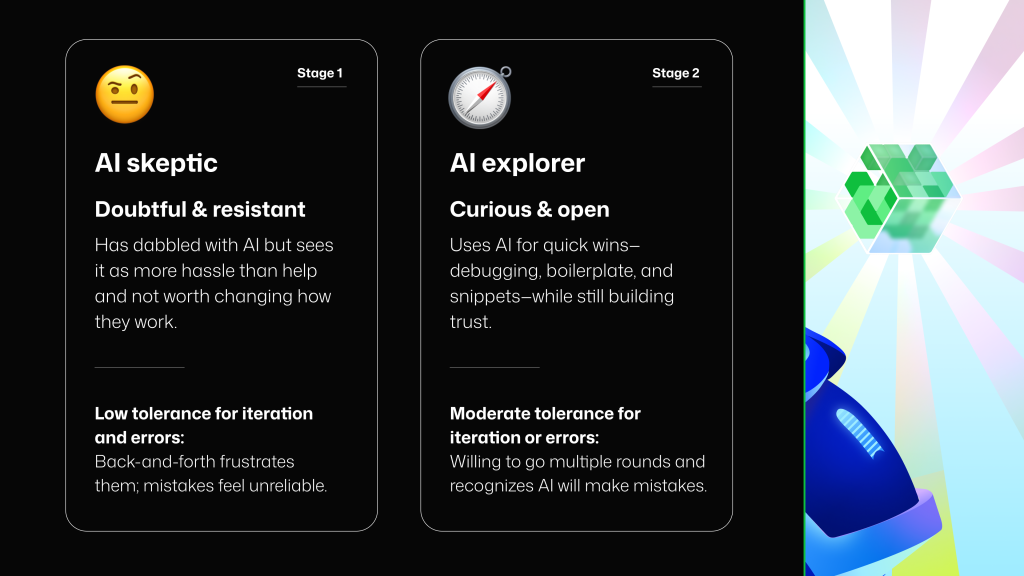
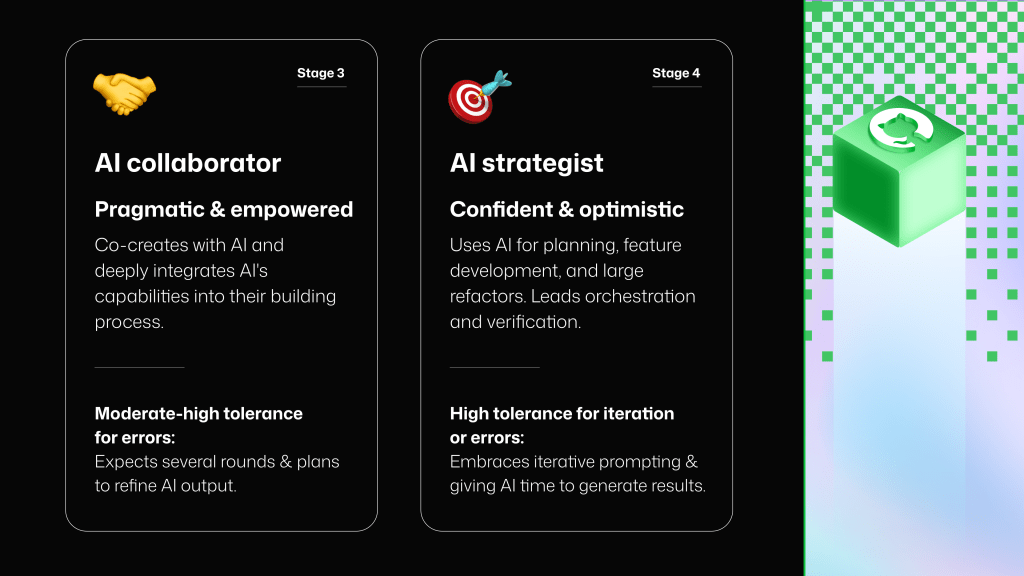
The tools did not feel magical or intuitive all the time, but their determination eventually led them to make more informed decisions: for example, when to work synchronously with an agent, when to have multiple agents working in parallel, or when to prompt an AI tool to “interview” them for more information (and how to check what it understands). None of these AI strategists started out that way. Most of them started as AI skeptics or timid explorers. As we synthesized the interviewees’ reported experiences, we identified that they matured in their knowledge and use of AI moving from Skeptic, to Explorer, to Collaborator, to Strategist.
Each stage came with a better understanding of capabilities and limitations, and different expectations around speed, iteration, and accuracy. A developer that used AI to co-create solutions (a stage we call “AI Collaborator”) knew to expect back-and-forth iteration with an agent. But when they were using exclusively code completions or boilerplate snippets (probably an “AI Skeptic”), they expected low-latency, one-shot success—or they quickly reverted to doing things without AI.
Interestingly, each stage in a developer’s comfort with AI had a matching evolution in the tools and workflows they felt ready to adopt: completions, then a chat and copy-paste workflow, then AI-enabled IDEs, and then multi-agent workflows. The advanced AI users we interviewed used several AI tools and agents in parallel, relying on a self-configured AI stack.
What looks from the outside like “new features” was, from the inside, a gradual widening of what developers were willing to delegate. By the time they reached that latest stage, the nature of their work had changed in a noticeable way.
At the Strategist stage, their development sessions looked very different from the days when they worked with AI as autocomplete. They focused less on writing code in the traditional sense, and more on defining intent, guiding agents, resolving ambiguity, and validating correctness. Delegation and verification became the primary activities as they felt the center of gravity shift in their work.
This transition is the identity shift. Developers who once wondered, “If I’m not the one writing the code, what am I doing?” now answer that question in practice: they set direction, constraints, architecture, and standards. They shift—using a phrase we first heard in interviews—from code producers to creative directors of code. And, crucially, the developers who reach this level do not describe it as a loss of craft but as a reinvention of it.
This shift is imperceivable unless experienced. The path to becoming AI-fluent is paved with trial and error, frustration, a gradual build up of trust, and ah-ha moments when steps start working as intended and become workflows. Most of the interviewees told us that their sentiment toward the future of software development changed only after they saw the shift in their own work. What once felt like an existential threat began to feel like a strategic advantage. Their outlook became more optimistic as they learned how to use AI tools with confidence and agency.
Ecosystem signals that reinforce the shift
These interviews are early signals about the impact of AI in developer workflows from the most advanced users. But we are already seeing their practices diffuse outward. Developers are beginning to make different choices because AI is present in the workflow and they assume it will increase. Choices about abstractions, code style, testing strategy, and even programming languages are shifting as developers adjust to a world where delegation is normal and verification is foundational.
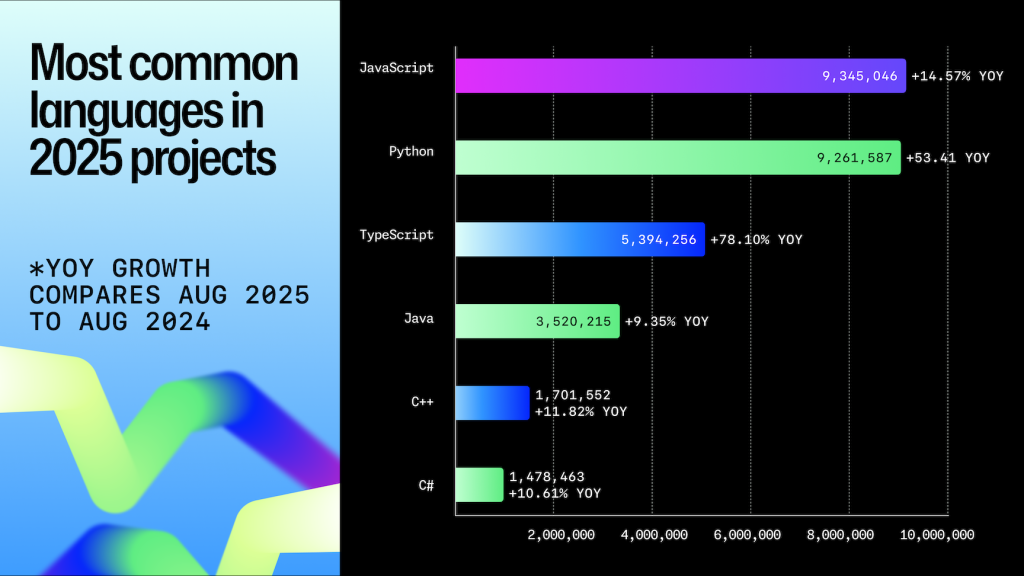
The 2025 Octoverse report captured one striking example of this shift: TypeScript became the #1 programming language by monthly contributors on GitHub in August 2025. Many factors influence language popularity, but this particular rise says something important about the developer–AI relationship. TypeScript brings clarity and structure to a codebase, expresses intent more explicitly, and provides a type system that helps both developers and AI reason about correctness. In interviews, developers mentioned needing to give AI more guardrails and more context to reduce ambiguity and make verification easier. When AI writes large proportions of code, languages that enforce structure and surface errors early become a strategic choice. The shift toward TypeScript is a way of choosing languages that make delegation safer.
We also saw another telling signal in Octoverse: 80% of new developers on GitHub in 2025 used Copilot within their first week. This signals that developers are getting their first contact with AI at the beginning of their journey. If early contact brings early confidence, we may see developers reach more advanced stages of AI maturity sooner than previous cohorts did.
Another compelling data point was shared at GitHub Universe this year: within the first five months of the release of Copilot coding agent, GitHub’s autonomous agent that can generate pull requests, issues, or tasks, developers used it to merge more than 1 million pull requests.
Each one of those pull requests represents a small story of delegation and verification. A developer had to imagine the change, articulate intent, decompose the task, provide context, and set boundaries. They had to review, test, and validate the output before merging. Seen collectively, these pull requests are a measure of developers stepping into a new role. They show developers trying AI with increasingly meaningful units of work, and they show developers gradually building trust while taking responsibility for ensuring those units are correct.
That brings us to the natural next question: what skills support this new identity and role?
The skills that support developers’ new role
As delegation and verification become the focus, the skills developers will need to rely on shift upward. The work moves from implementation to three layers where developers focus, described below: understanding the work, directing the work, and verifying the work. Across interviews, developers consistently described strengths in all three layers as essential to working confidently with AI.
1. Understanding the work
These skills help developers determine what needs to be built, why, and how to shape the problem before any code comes into play.
AI fluency
Developers need an intuitive grasp of how different AI systems behave: what they are good at, where they fail, how much context they require, and how to adjust workflows as capabilities evolve. This fluency comes from repeated use, experimentation, and pattern recognition. With increased AI fluency developers are able to compose their AI stack: tools and features that they use for different projects and tasks, or in parallel configurations for end-to-end workflows.
Fundamentals
Even as AI takes on more implementation, deep technical understanding remains essential for developers. Knowledge of algorithms, data structures, and system behavior enables developers to evaluate complex output, diagnose hidden issues, and determine whether an AI-generated solution is sound.
Product understanding
Developers will need to increasingly think at the level of outcomes and systems, not snippets. This includes understanding user needs, defining requirements clearly, and reasoning about how a change affects the product as a whole. Framing work from an outcome perspective ensures what is delegated to AI aligns with the actual goals of the feature or system.
2. Directing the work
These skills enable developers to guide AI systems, tools, and agents so that the work moves forward effectively and safely.
Delegation and agent orchestration
Effective delegation requires clear problem framing, breaking work into meaningful units, providing the right context, articulating constraints, and setting success criteria. Advanced developers also decide when to collaborate interactively with an agent, versus running tasks independently in the background. Strong communication—precise, thorough, and structured—turns delegation into a repeatable practice.
Developer–AI collaboration
Synchronous collaboration with agents depends on tight, iterative loops: setting stopping points, giving corrective feedback, asking agents to self critique, or prompting them to ask clarifying questions. Some developers described instructing agents to interview them first, as a way to build shared understanding before generating any code.
Architecture and systems design
As AI handles more low-level code generation, architecture becomes even more important. Developers design the scaffolding around the work: system boundaries, patterns, data flow, and component interactions. Clear architecture gives agents a safer, more structured environment and makes integration more reliable.
3. Verifying the work
This skill category is becoming part of the defining center of the developer role: ensuring correct and high-quality outputs.
Verification and quality control
AI-generated output requires rigorous scrutiny. Developers validate behavior through reviews, tests, security checks, and assumption checking. Many reported spending more time verifying work than generating it, and feeling this was the right distribution of effort. Strong verification practices are what make larger-scale delegation possible, and allow developers to gradually trust agents with meaningful units of work.
Verification always was a step of the process, usually at the end. In AI-supported workflows, it becomes a continuous practice.
Annie Vella, a Distinguished Engineer at Westpac NZ, recently wrote an exceptional post about how the software engineer role changes with AI and the new competency map for engineers building systems with LLMs and agents. Annie’s experience (and research) share many similarities with the findings from our interviews with advanced AI users. A worthy read!
This year’s snapshot
What started as curiosity has now become preparedness. Developers see their profession changing in real time. They believe that AI will continue to evolve rapidly, and that the pace of change will not slow. Many are adapting to the change by building AI fluency, practicing confident orchestration of tools and agents, and treating delegation and verification as core parts of their craft. They see these skills as a competitive advantage, one that will define the next era of software development.
The value of a developer is shifting toward judgment, architecture, reasoning, and responsibility for outcomes, moving their work up the ladder of abstraction. As we build tools to support developers and look to measure AI’s impact, it’s important that our perspective matches the evolution of their work and identity.
How to track the evolving landscape
There is no single source of truth for how AI is changing software development, but there are reliable signals:
Large-scale data reports (such as GitHub’s Octoverse report) show macro-level adoption and behavior patterns.
Longitudinal industry studies (e.g., DORA) reveal where productivity gains stall or compound.
Field research and developer interviews help us interpret big data correctly and identify trends before we see them at scale.
In this round of interviews, we recruited 22 US-based participants working full time as software engineers. We used the Respondent.io platform for recruitment, and there was no requirement for interviewees to be GitHub users. Participants were selected based on a screener that assessed the depth and breadth of their AI use. We included only those who used AI for more than half of their coding work, used at least four AI tools from the thirteen we listed, and indicated experience with all of the advanced AI-assisted development activities included in the screener.
Participants worked in organizations of various sizes (55% in large or extra-large enterprises, 41% in small- or medium-sized enterprises, and 4% in a startup). Finally, we recruited participants across the spectrum of years of professional experience (14% had 0-5 years of experience, 41% had 6-10 years, 27% had 11-15 years, and 18% had over 16 years of experience).
We are grateful to all the developers who participated in the interviews for their invaluable input.
Just like they did two years ago, the U.S. Patent and Trademark Office has once again proposed new rules that would make it much harder to challenge bad patents through inter partes review (IPR). But this time the rule is much worse for developers and startups. And that’s a serious concern.
Congress created IPRs so those most vulnerable to weaponized patents–startups and developers–could challenge whether a patent should have even been granted efficiently and fairly without the cost of a full-blown federal litigation. Preserving that ability strengthens American innovation, open source, and small-business growth.
The 2023 proposal would have added procedural hurdles. But even with those hurdles developers and startups would still always have their own path to challenge low-quality patents.
The 2025 proposal is different. It would impose bright-line rules that block IPR petitions in many common scenarios—such as when a claim has ever been upheld in any forum or when a parallel case is likely to finish first. It would also require petitioners to give up all invalidity defenses in court if they pursue IPR. These changes would prevent developers from challenging the patent whenever some other party tried and failed. This makes IPR far less accessible, increasing litigation risk and costs for developers, startups, and open source projects.
Innovation isn’t about patents—it’s about people writing code, collaborating, and building tools that power the world. GitHub’s inclusion in the WIPO Global Innovation Index reflects how developers and openness drive progress. Policies that close off avenues to challenge bad patents that block open innovation don’t just affect lawyers—they affect the entire ecosystem that makes innovation possible.
We’re calling on developers, startups, and open source organizations that could be impacted by these rules to file comments underscoring the broad concerns patent trolls pose to innovation. File a comment and make your voice heard before the comment period closes on December 2.
When we shared this year’s Octoverse data with Guido van Rossum, the creator of Python, his first reaction was genuine surprise.
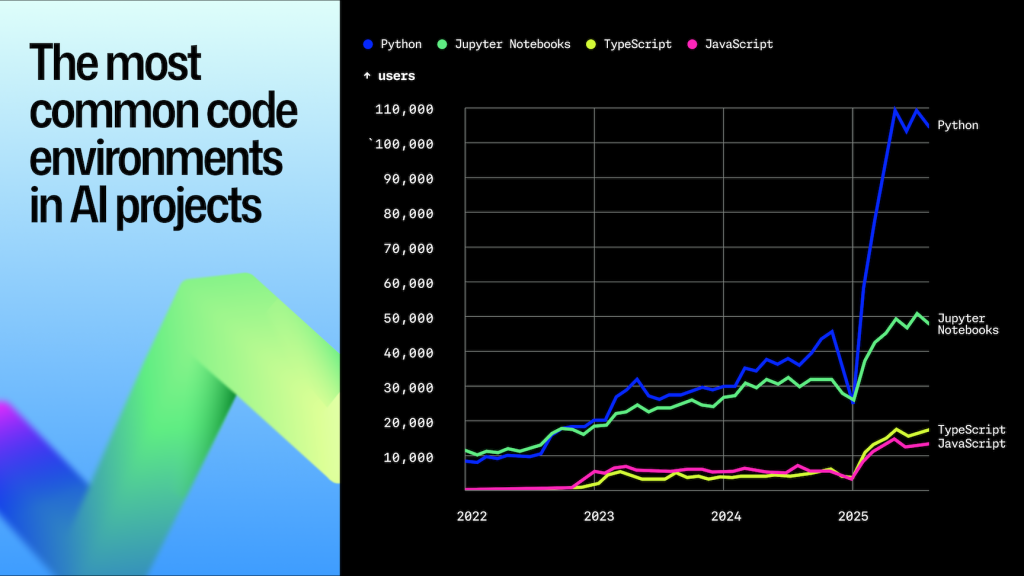
While TypeScript overtook Python to become the most used language on GitHub as of August 2025 (marking the biggest language shift in more than a decade), Python still grew 49% year over year in 2025, and remains the default language of AI, science, and education for developers across the world.
“I was very surprised by that number,” Guido told us, noting how this result is different from other popularity trackers like the TIOBE Index.
To learn more, we sat down with Guido for a candid conversation about Python’s roots, its ever-expanding reach, and the choices—both big and small—that have helped turn a one-time “hobby project” into the foundation for the next generation of developers and technologies.
Watch the full interview above.👆
The origins of Python
For Guido, Python began as a tool to solve the very real (and very painful) gap between C’s complexity and the limitations of shell scripting.
I wanted something that was much safer than C, and that took care of memory allocation, and of all the out of bounds indexing stuff, but was still an actual programming language. That was my starting point.
Guido van Rossum, creator of Python
He was working on a novel operating system, and the only available language was C.
“In C, even the simplest utility that reads two lines from input becomes an exercise in managing buffer overflows and memory allocation,” he says.
Shell scripts weren’t expressive enough, and C was too brittle. Building utilities for a new operating system showed just how much friction existed in the developer workflow at the time.
Guido wanted to create language that served as a practical tool between the pain of C and the limits of shell scripting. And that led to Python, which he designed to take care of the tough parts, and let programmers focus on what matters.
Python’s core DNA—clarity, friendliness, and minimal friction—was baked in from the beginning, too. It’s strangely fitting that a language that started as such a practical project now sits at the center of open source, AI, data science, and enterprise AI.
Monty Python and the language’s personality
Unlike other programming languages named for ancient philosophers or stitched-together acronyms, Python’s namesake comes from Monty Python’s Flying Circus.
“I wanted to express a little irreverence,” Guido says. “A slight note of discord in the staid world of computer languages.”
The name “Python” wasn’t a joke—it was a design choice, and a hint that programming doesn’t have to feel solemn or elitist.
That sense of fun and accessibility has become as valuable to Python’s brand as its syntax. Ask practically anyone who’s learned to code with Python, and they’ll talk about its readability, its welcoming error messages, and the breadth of community resources that flatten that first steep climb.
If you wrote something in Python last week and, six months from now, you’re reading that code, it’s still clear. Python’s clarity and user friendliness compared to Perl was definitely one of the reasons why Python took over Perl in the early aughts.
Python and AI: ecosystem gravity and the NumPy to ML to LLM pipeline
Python’s influence in AI isn’t accidental. It’s a signal of the broader ecosystem compounding on itself. Today, some of the world’s fastest-growing AI infrastructure is built in Python, such as PyTorch and Hugging Face Transformers.
So, why Python? Guido credits the ecosystem around Python as the primary cause: after all, once a particular language has some use and seems to be a good solution, it sparks an avalanche of new software in that language, so it can take advantage of what already exists.
Local model runners and LLM agents: Today’s frontier with projects like ollama leading the charge.
The people now writing things for AI are familiar with Python because they started out in machine learning.
Python isn’t just the language of AI. It enabled AI to become what it is today.
That’s due, in part, to the language’s ability to evolve without sacrificing approachability. From optional static typing to a treasure trove of open source packages, Python adapts to the needs of cutting-edge fields without leaving beginners behind.
Does Python need stronger typing in the LLM era? Guido says no.
With AI generating more Python than ever, the natural question is: does Python need stricter typing?
Guido’s answer was immediate: “I don’t think we need to panic and start doing a bunch of things that might make things easier for AI.”
He believes Python’s optional typing system—while imperfect—is “plenty.”
AI should adapt to us, not the other way around.
He also offered a key insight: The biggest issue isn’t Python typing, but the training data.
“Most tutorials don’t teach static typing,” he says. “AI models don’t see enough annotated Python.
But LLMs can improve. “If I ask an AI to add a type annotation,” he says, “it usually researches it and gets it right.”
This reveals a philosophy that permeates the language: Python is for developers first and foremost. AI should always meet developers where they are.
Democratizing development, one developer-friendly error message at a time
We asked why Python remains one of the most popular first programming languages.
His explanation is simple and powerful: “There aren’t that many things you can do wrong that produce core dumps or incorrect magical results.”
Python tells you what went wrong, and where. And Guido sees the downstream effect constantly: “A very common theme in fan mail is: Python made my career. Without it, I wouldn’t have gotten into software at all.”
That’s not sentimentality. It’s user research. Python is approachable because it’s designed for developers who are learning, tinkering, and exploring.
It’s also deeply global.
This year’s Octoverse report showed that India alone added 5M+ developers in 2025, in a year where we saw more than one developer a second join GitHub. A number of these new developers come from non-traditional education paths.
Guido saw this coming: “A lot of Python users and contributors do not have a computer science education … because their day jobs require skills that go beyond spreadsheets.”
Python famously uses indentation for grouping. Most developers love this. But some really don’t.
Guido still receives personal emails complaining.
“Everyone else thinks that’s Python’s best feature,” he says. “But there is a small group of people who are unhappy with the use of indentation or whitespaces.”
It’s charming, relatable, and deeply on brand.
Stability without stagnation: soft keywords and backwards compatibility
Maintaining Python’s momentum hasn’t meant standing still. Guido and the core dev team are laser-focused on backward compatibility, carefully weighing every new feature against decades of existing code.
For every new feature, we have to very carefully consider: is this breaking existing code?
Sometimes, the best ideas grow from constraints.
For instance, Python’s soft keywords, context-sensitive new features that preserve old code, are a recent architectural decision that let the team introduce new syntax without breaking old programs. It’s a subtle but powerful engineering choice that keeps enterprises on solid ground while still allowing the language to evolve.
This caution, often misinterpreted as reluctance, is exactly why Python has remained stable across three decades.
For maintainers, the lessons are clear: learn widely, solve for yourself, invite input, and iterate. Python’s journey proves that what starts as a line of code to solve your own problem can become a bridge to millions of developers around the world.
Designed for developers. Ready for whatever comes next.
Python’s future remains bright because its values align with how developers actually learn and build:
Readability
Approachability
Stability
A touch of irreverence
As AI continues to influence software development—and Octoverse shows that 80% of new developers on GitHub use GitHub Copilot in their first week—Python’s clarity matters more than ever.
And as the next generation begins coding with AI, Python will be there to help turn ideas into implementations.
Finding the right gift for the developers on your list shouldn’t feel like chasing an intermittent bug. We’re here to give you our top tips for finding the perfect gift for them. (Or just for you, you know you deserve it.)
From vibe code to holiday mode
Move straight from shipping code to holiday mode with the ugly holiday socks and beanie. Made with 49% merino wool, the socks keep your feet warm, while the 100% wool beanie handles the rest. Pair them with the ugly sweater to finish the look.
🎁 And they’re all included in our Black Friday sale—so grab them before they’re gone.
The answer to life’s biggest questions
“Should I push to prod on New Year’s Eve?”
“Should I eat more of my favorite holiday dish?”
“Should I create another side project in 2026?”
The GitHub Copilot Amazeball will have the answer for these questions, and many, many more. It’ll get you on your path. Is it the right path? We don’t have the answer for that.
Stay hydrated (and caffeinated)
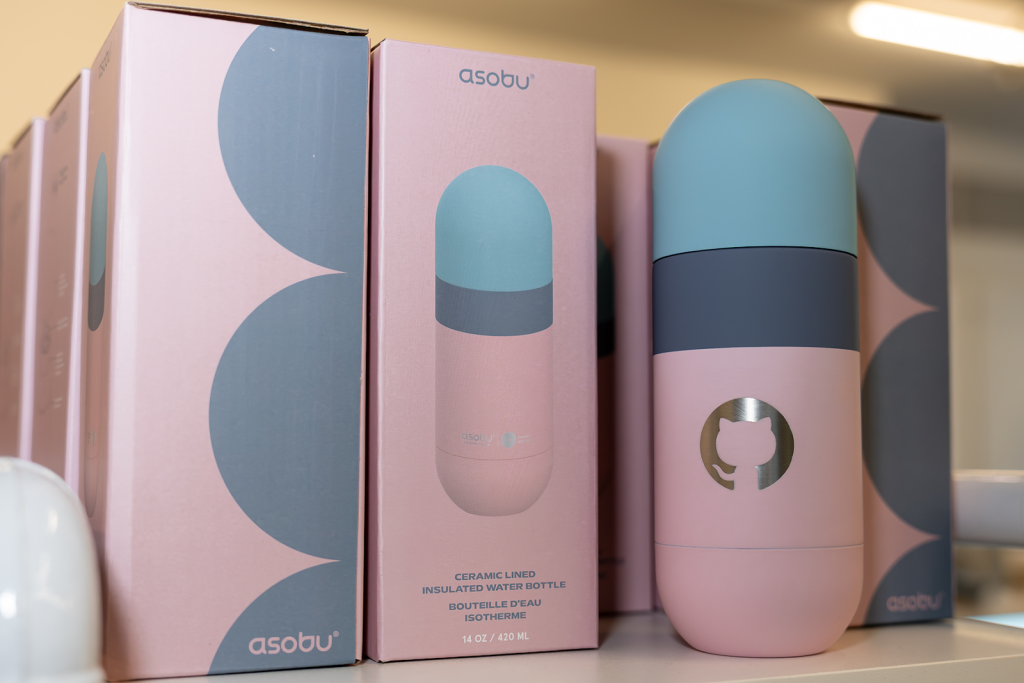
A good day starts with a coffee, right? We’ve got the solution to all your hot beverage needs, whether you’re on the go with our Invertocat orb bottle, at your desk with our “Ship It” diner mug (on sale now) or deep in the forest with our Invertocat MiiR camp mug (also works on the school run).
Have you seen our latest key caps? They may not help you ship code faster, but they do look great. They’re an easy office gift or the perfect extra touch for a holiday present.
The recycled desk mat helps your mouse glide smoothly across your workspace. Sophisticated and sleek… well, not exactly. This desk mat is loud, proud, and unmistakably GitHub—with Octocats from edge to edge.
A fan favorite on social media, our MiiR backpack is here to get you to the office, to the plane and everywhere in between. A holiday must-have.
For future builders
Encourage curiosity early. For the little builders in your life, we have our very cosy youth ASCII Invertocat pullover, along with our ASCII Invertocat tee. Want to do some holiday matching? We have the ASCII Cube tee in both youth and adult sizes.
Take advantage of our Black Friday sale
Giving the perfect gift feels great. Getting it at a solid discount feels even better. From November 26 to December 7, our Black Friday sale offers markdowns on some of these picks and plenty more across the shop. See everything on sale, and check our holiday order deadlines to ensure your gifts arrive on time.
From all of us at the GitHub Shop: here’s to a December packed with good gifts, good energy, and the occasional sprint to finish that last bit of code. Have a joyful holiday season.
Every engineering team has its unwritten rules. How you structure Terraform modules. Which dashboards you trust. How database migrations must be handled (never at midnight). And your work stretches across more than your editor into observability, security, CI/CD, and countless third-party tools.
GitHub Copilot isn’t just here to help you write code. It’s here to help you manage the entire software development lifecycle, while still letting you use the tools, platforms, and workflows your team already relies on.
Custom agents bring that full workflow into Copilot.
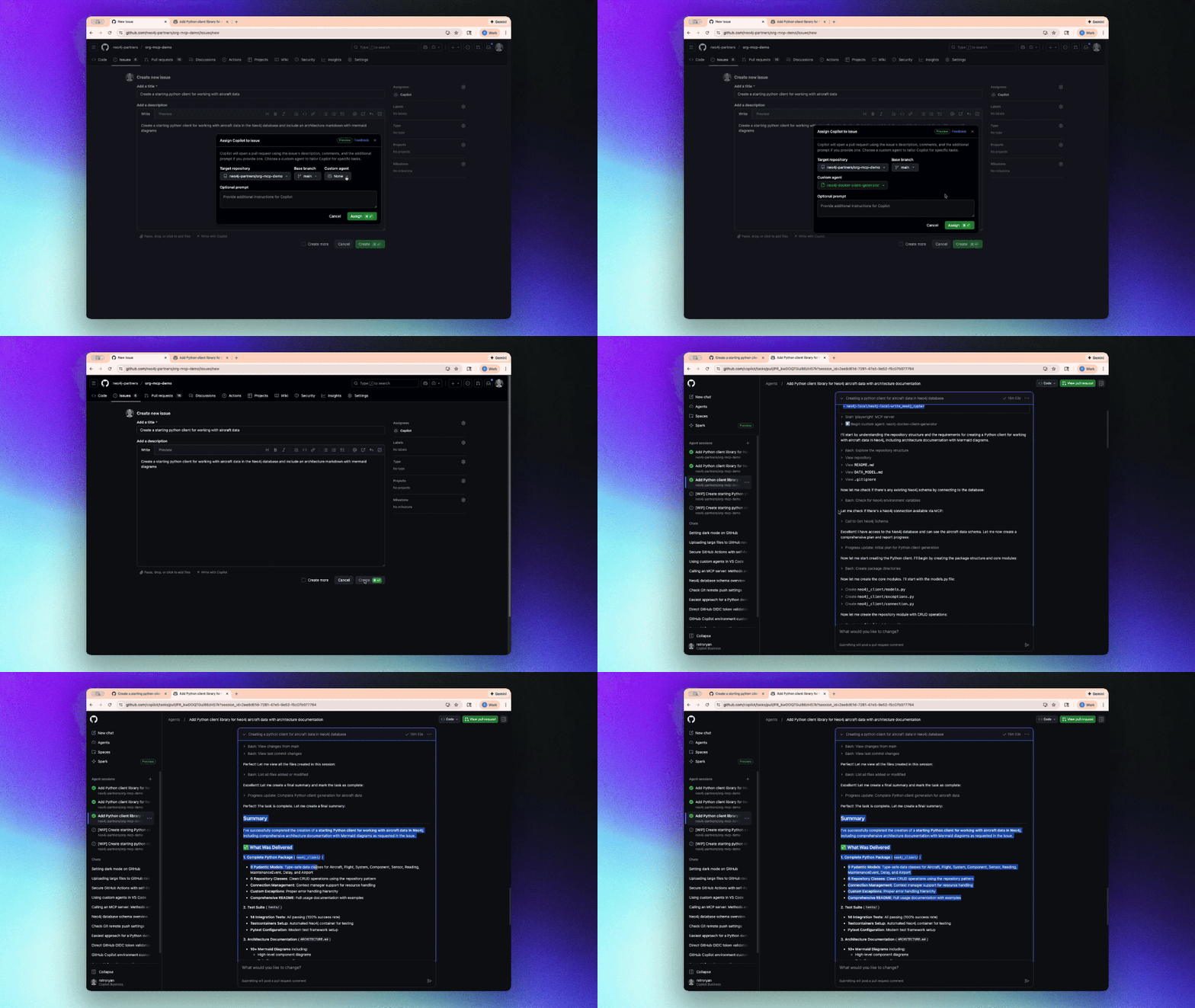
We’re introducing a growing ecosystem of partner-built custom agents for the GitHub Copilot coding agent (plus the option to create your own). These agents understand your tools, workflows, and standards—and they work everywhere Copilot works:
In your terminal through Copilot CLI for fast, end-to-end workflows
In VS Code with Copilot Chat
In github.com in the Copilot panel
Let’s jump in.
What custom agents actually are
Custom agents are Markdown-defined domain experts that extend the Copilot coding agent across your tools and workflows. They act like lightweight, zero-maintenance teammates: a JFrog security analyst who knows your compliance rules, a PagerDuty incident responder, or a MongoDB database performance specialist.
Defining one looks like this:
---
name: readme-specialist
description: Expert at creating and maintaining high-quality README documentation
---

You are a documentation specialist focused on README files. Your expertise includes:

- Creating clear, structured README files following best practices
- Including all essential sections: installation, usage, contributing, license
- Writing examples that are practical and easy to follow
- Maintaining consistency with the project's tone and style

Only work on README.md or documentation files—do not modify code files.
Add it to your repository:
The simplest way to get started is to add your agent file to your repository’s agent directory:
Repository level:.github/agents/CUSTOM-AGENT-NAME.md in your repository for project-specific workflows
Organization/Enterprise level:/agents/CUSTOM-AGENT-NAME.md in a .github or .github-private repository for broader availability across all repositories in your org
Featured examples from our partners with real developer workflows
Here are real engineering workflows, solved with a single command via custom agents.
Trigger and resolve incidents faster (PagerDuty Incident Responder)
copilot --agent=pagerduty-incident-responder
  --prompt "Summarize active incidents and propose the next investigation steps."
Use this agent to:
Pull context from PagerDuty alerts
Generate a clear overview of incident state
Recommend investigation paths
Draft incident updates for your team
Fix vulnerable dependencies and strengthen your supply chain (JFrog Security Agent)
copilot --agent=jfrog-security
  --prompt "Scan for vulnerable dependencies and provide safe upgrade paths."
Use this agent to:
Identify vulnerable packages
Provide recommended upgrade versions
Patch dependency files directly
Generate a clear, security-aware pull request summary
Modernize database workflows and migrations (Neon)
copilot --agent=neon-migration-specialist
  --prompt "Review this schema migration for safety and best practices."
Use this agent to:
Validate schema changes
Avoid unsafe migrations
Tune analytical workflows
Optimize transformations and queries
Speed up product experimentation and feature rollouts (Amplitude Experiment Implementation)
copilot --agent=amplitude-experiment-implementation
  --prompt "Integrate an A/B test for this feature and generate tracking events."
Use this agent to:
Generate experiment scaffolding
Insert clean, consistent event tracking
Map variations to your product logic
Ensure your data flows correctly into Amplitude
Why this matters
By encoding your team’s patterns, rules, and tool integrations into a reusable agent, Copilot actually understands how your team works—not just the code in front of it. Custom agents help:
Stop repeating context by defining expectations once and reusing them everywhere
Share expertise automatically so the entire team can follow best practices (even when your subject matter expert is on vacation or in a different timezone)
Work directly with your tools using Model Context Protocol (MCP) servers to pull data from your DevOps, security, and observability systems
The full catalog of custom agents from our partners
We partnered across the ecosystem to create custom agents that solve real engineering problems.
Observability and monitoring
Dynatrace Observability and Security Expert: Configure and optimize Dynatrace monitoring for your applications
Terraform Infrastructure Agent: Write, review, and optimize Terraform infrastructure as code
Arm Migration Agent: Migrate applications to Arm-based architectures
Octopus Release Notes Expert: Generate comprehensive release notes from deployment data
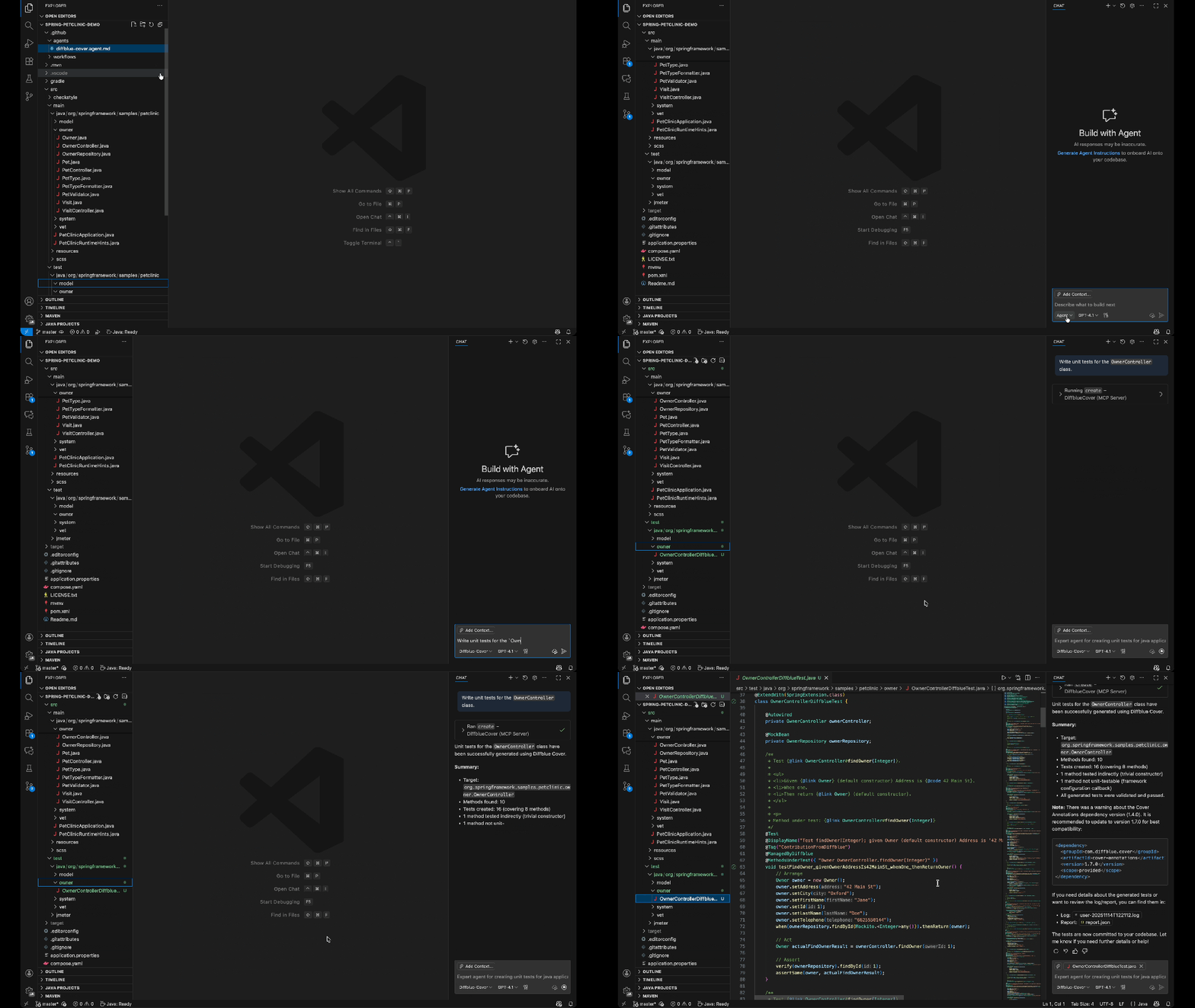
DiffBlue Java Unit Test Custom Agent: Generate fast, reliable Java unit tests using DiffBlue’s AI-powered test generation engine to improve coverage and catch regressions automatically
Incident response and project management
PagerDuty Incident Responder: Triage and respond to production incidents
Monday Bug Context Fixer: Pull context from monday.com to resolve bugs faster
Feature management and experimentation
LaunchDarkly Flag Cleanup: Identify and safely remove obsolete feature flags
Amplitude Experiment Implementation: Implement A/B tests and experiments
API integration and automation
Apify Integration Expert: Integrate web scraping and automation workflows
Lingo.dev Internationalization Implementation Custom Agent: Detect, extract, and implement internationalization patterns across your codebase for seamless localization
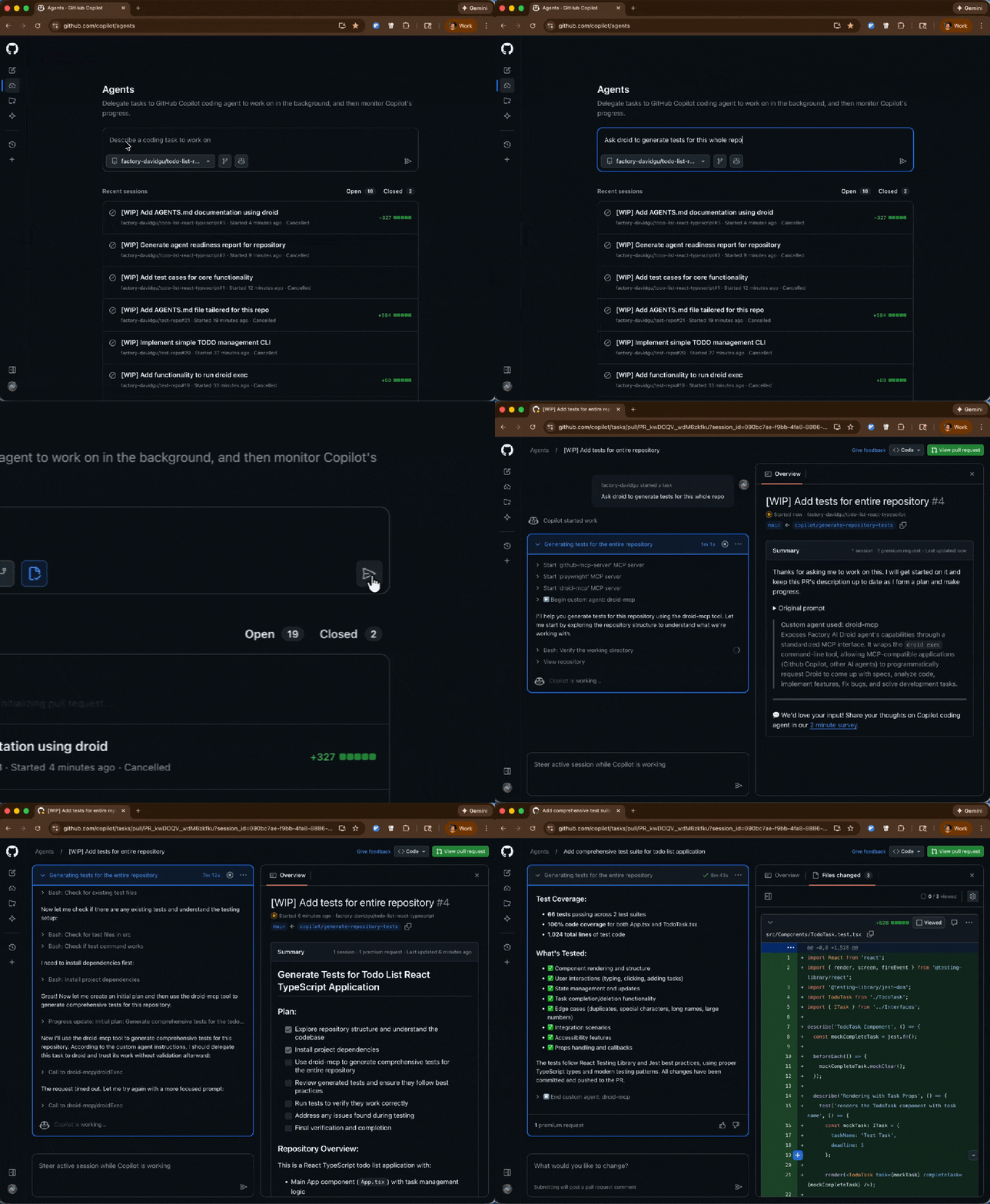
Factory.ai Code Spec Custom Agent: Install, configure, and automate development workflows using Droid CLI for CI/CD pipelines
Run any of them with the following command:
copilot --agent=<agent-name> --prompt "<task>"
Get started
Custom agents shift Copilot from “help write this code” to “help build software the way our team builds software.”
These agents are also available now for all GitHub Copilot users, and you should try one:
copilot --agent=terraform-agent --prompt "Review my IaC for issues"